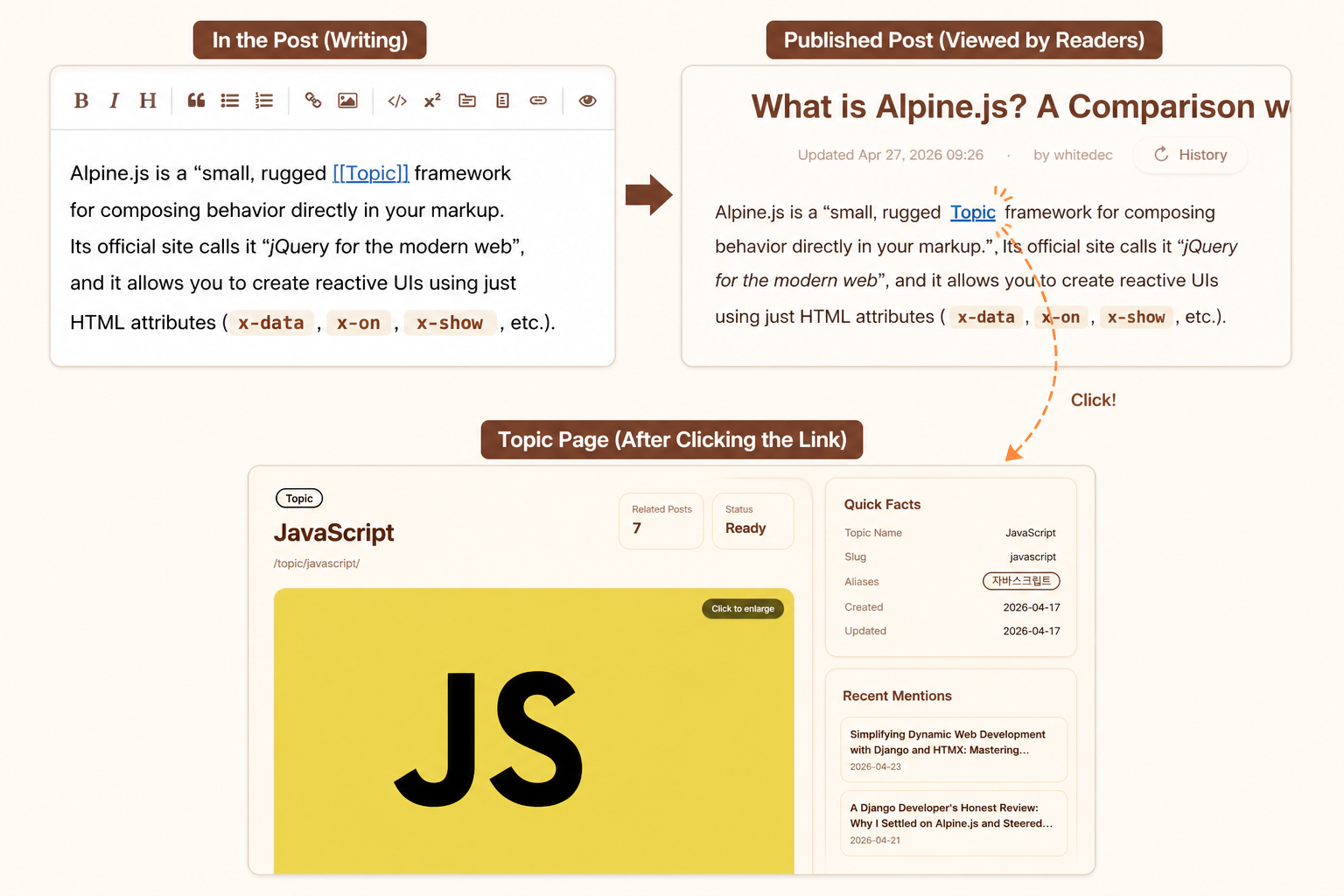
What is a Topic?
A Topic is a feature in Mikihands Blog that connects your posts into theme-based knowledge hubs.
In a typical blog, posts pile up in chronological order. When you publish a new post, older posts gradually move further back, and even posts written about the same subject can easily appear scattered and disconnected.
Mikihands Topics solve this problem. People, places, products, concepts, projects, technologies, interests, and other things that appear repeatedly in your posts can be grouped into a single Topic, creating a central page that automatically gathers related posts.
A Topic is not just a tag. It is a small knowledge page where posts, images, related topics, descriptions, and official links come together around one central subject.
Why are Topics important?
As you run a blog for a long time, your posts continue to grow in number. But visitors usually only see your “recent posts.” Even if you have written many good posts, the value of your entire blog does not come through clearly if older posts are not connected to one another.
Topics transform your blog from a chronological list of posts into a knowledge network.
A single Topic page gathers posts connected to that subject. Visitors do not simply read one post and leave; they can naturally discover other posts about the same topic.
In other words, Topics serve the following roles.
- They organize scattered posts by subject.
- They help visitors find related posts more easily.
- They make your blog look less like a simple diary and more like a knowledge hub.
- They help search engines understand the main subjects of your blog.
- They create new paths for older posts to be rediscovered.
In Mikihands Blog, Topics are a core feature that shapes the structure of your blog.
How can Topics help my blog appear higher on Google?
A typical blog post can gradually lose visibility in search results as time passes. However, a well-managed Topic page sends a strong signal to search engines like Google that “this blog has highly specialized and well-structured information about this subject.”
Automatic internal link optimization: The [[Topic]] syntax in your post automatically connects related pages in a dense and structured way. This performs “Internal Linking” optimization, helping search robots understand the structure of your blog.
Proof of authority: Google tends to value well-organized “hub pages” about a specific subject more than isolated individual documents. Since a Topic page brings together related posts, images, and official links, search engines can recognize it as a highly valuable source of specialized information.
Capturing long-tail keywords: Not only the Topic name, but also the Aliases you set can work as search keywords. This increases the chance that visitors will reach your knowledge hub no matter which search terms they use.
How are Topics different from tags?
Tags are usually short labels used to classify posts in a simple way.
For example, words such as K-POP, BTS, and Dynamite can be attached to posts to group them together, mainly functioning as keywords for post search.
Topics, however, play a broader role.
A Topic can have its own independent page, include a description, have a featured image, and gather related posts and related images. You can also manage similar expressions as aliases or merge duplicate Topics.
In simple terms, the difference is as follows.
| Category | Tag | Topic |
|---|---|---|
| Purpose | Simple classification | Subject-centered knowledge hub |
| Page | Close to a simple list | Independent Topic page |
| Description | Usually none | A subject description can be written |
| Image | Usually none | Featured images and related images can be used |
| Expandability | Limited | Can expand through related posts, related Topics, official links, and more |
If a tag is a “label,” a Topic is closer to a “small homepage for a subject.”
How are Topics created?
When writing a post, you can insert a Topic into the body using the following format.
[[Mikihands]]
When you write it this way, the post is connected to a Topic called Mikihands.
If a Topic with the same name already exists, the post is connected to the existing Topic. If it does not exist yet, a new Topic is created.
For example, you can write the following in the body of a post.
Today, I subscribed to the [[Mikihands]] blog platform through a [[PayPal]] payment.
In this case, the post is connected to two Topics: Mikihands and PayPal.
What can you see on a Topic page?
Each Topic has its own independent Topic page. A Topic page gathers and displays various pieces of information around that subject.
On a Topic page, you can generally see the following content.
1. Topic name and description
A Topic page first displays the Topic name and a brief description. This description helps visitors quickly understand “what this Topic means.”
For example, a Mikihands Topic could be described as follows.
Mikihands is a blog platform that helps you connect posts into theme-based knowledge hubs and run your blog like a personal brand through a custom domain. It supports writing, multilingual publishing, search visibility, and Topic-based structuring, helping your blog grow beyond a simple list of posts into an expanding knowledge space.
2. Related posts
Posts connected to this Topic are gathered together. Visitors can continue reading posts about one subject in one place.
3. Related images
Images used inside connected posts can be gathered based on the Topic. This helps the Topic page look less like a simple list of posts and more like a visual hub.
4. Related Topics
Other Topics that frequently appear together in the same posts may be displayed. Related Topics show how one subject is connected to other concepts within your blog.
For example, the House of Tudor Topic may display related Topics such as Henry VII, Henry VIII, Edward VI, Mary I, and Elizabeth I.
These Topics are each independent people or concepts, but they are strongly connected within the larger context of the Tudor dynasty. In this way, related Topics help visitors move naturally from one post to other concepts within your blog instead of stopping after a single article.
5. Official links
If a Topic has an external official page, such as a person, brand, product, open-source project, or organization, you can add links such as a homepage, GitHub, YouTube, or Instagram.
This makes the Topic page feel more complete, like a small information card.
How should I write a Topic description?
A Topic description does not need to be too long. It is enough if visitors can quickly understand “what this Topic is about.”
It is recommended to write it so that search engines and readers can look at the Topic page and understand, “Ah, this Topic refers to this concept.”
Example:
Django is a high-level web framework based on Python, designed for rapid development and practical design. It was released in 2005 and provides high productivity based on Python’s intuitive syntax.
Another example:
Tokyo is the capital of Japan, as well as a metropolis and city located in the Kanto region. It is a global city where Japan’s politics, economy, and culture are concentrated. As of 2024, its population is 14,133,086, making it the most populous administrative prefecture in Japan.
It is fine to start with a short description. As your posts accumulate, you can gradually refine the Topic description.
Why do featured images matter?
A featured image creates the first impression of a Topic.
A Topic page with an image that clearly represents the subject is much more memorable than a Topic page made only of text. Featured images are especially helpful for Topics related to people, places, products, brands, and projects.
Featured images are useful in the following cases.
- When you want the Topic page to look more complete
- When you want visitors to recognize the subject quickly
- When you want the Topic to stand out more on the main page or Topic list
- When you want to create a better impression in search or sharing screens
Whenever possible, it is best to choose a clean image that represents the Topic well.
What is an Alias?
An Alias is another name that points to the same Topic.
People and concepts are often not referred to by just one name. For example, a person may be called by their real name, nickname, English name, Japanese name, abbreviation, and more.
If every expression is created as a separate Topic, your posts can become scattered. By using Aliases, you can connect multiple names to a single Topic.
Example:
- Topic name:
OpenAI - Alias:
오픈AI,ChatGPT developer
Setting Aliases properly makes search and autocomplete more convenient and reduces the chance that the same concept will be split into multiple Topics.
What is Topic Merge?
Topic Merge is a feature for combining duplicate Topics into one.
When you run a blog for a long time or write posts in multiple languages, you may create the same subject several times under slightly different names.
For example, the following Topics may be created separately.
United StatesUSAアメリカ미국
All of these expressions refer to the same country. However, if each one exists as a separate Topic, related posts can become scattered across multiple Topic pages.
In this case, Topic Merge lets you choose one Topic to keep as the representative Topic and move the connection data from the other Topics into it.
For example, you can organize them as follows.
- Representative Topic:
United States - Merged Topic:
USA - Merged Topic:
アメリカ - Merged Topic:
미국
This allows posts that were scattered across different names to gather under a single Topic page.
This can happen especially often in multilingual blogs, because the same place, person, work, or product may be written differently depending on the language. Even in a long-running blog, you may later need to organize Topics that were created differently in the beginning.
For example, if you wrote about 미국 in Korean and USA in English, search engines and visitors may recognize them as separate subjects. But if you merge them into a single representative Topic called United States through Topic Merge, the following things happen:
- A knowledge hub across languages: Korean posts and English posts are gathered side by side on one Topic page, showing translated content in each language.
- Formation of global context: Visitors can see all of your insights about that subject in one place, regardless of which language you originally wrote in.
- Unified management: It serves as a powerful “funnel” that brings visitors arriving through different languages into one polished knowledge page.
What do Topic statuses mean?
A Topic can have a growth status.
A newly created Topic may not yet have enough connected posts or descriptions. Over time, as related posts accumulate, descriptions and images are added, and related Topics appear, it becomes a stronger Topic hub.
In general, you can understand the statuses as follows.
Growing
This is a Topic that is still growing. It may have only a few related posts, or it may lack descriptions, images, or connection data.
Strengthening
This is a Topic whose structure is beginning to take shape. It has a certain number of related posts and is gradually becoming meaningful as a Topic hub.
Ready
This is a Topic with enough completeness. It has related posts, descriptions, images, related Topics, and other elements well prepared, making it suitable to show to visitors.
These statuses are not so much an evaluation of “good” or “bad,” but more like guidance for developing a Topic into a better knowledge hub.
How to make good use of Topics
Using Topics well can make your entire blog much stronger.
1. Turn subjects you write about repeatedly into Topics
You do not need to turn every word that appears only once into a Topic. However, if it is a subject you are likely to write about several times in the future, it is a good idea to make it a Topic.
For example, the following subjects are well suited for Topics.
- Technologies you often write about
- Long-term projects
- People or brands you mention frequently
- Travel destinations or places
- Review subjects
- Fields you are studying
- Core themes of your blog
2. Choose Topic names that can appear naturally inside your writing
A Topic is not a category name. A Topic is closer to “one concrete and definable subject” that can actually be mentioned inside an article, such as a person, place, work, product, brand, project, event, or concept.
So instead of asking, “What kind of post is this?” when choosing a Topic name, it is better to ask, “What important subject appears repeatedly in this post?”
Good examples:
- Tokyo
- Large Language Model
- Harry Potter
- Starbucks
- iPhone
- Volcanic activity
- Nana, our family cat
- Mikihands
- ChatGPT
- Gemini
- Studio Ghibli
- The Lord of the Rings
- World War 2
Less ideal examples:
- Parenting journal
- Travel stories
- Studying English
- Restaurant reviews
- Everyday thoughts
- Product reviews
- Movie impressions
- Reading notes
For example, if you run a blog about your child’s growth, using your child’s name or nickname as a Topic is more natural than using parenting journal. As you write, your child’s name is likely to appear often in the body of your posts, while the phrase “parenting journal” may not appear every time.
The same applies to an English-learning blog. Instead of a Topic called studying English, it is better to use concrete concepts that can repeatedly appear in actual posts, such as TOEIC, shadowing, or BBC Radio.
A Topic name should not be the title of a classification chart. It should be a name that lives and moves inside your writing. The more naturally a name can appear multiple times in the body of your posts, the better it is as a Topic.
3. Use the same name repeatedly for the same concept
If you keep using the same Topic name for the same subject, the Topic page grows more quickly.
For example, if one post uses Tom Riddle, another uses Voldemort, and another uses You-Know-Who or Dark Lord, the Topics may be split into several separate pages even though they refer to the same person.
In this case, it is better to choose one representative Topic name and register the other names as Aliases.
For example, you can organize them as follows.
- Representative Topic:
Tom Riddle - Alias:
Voldemort - Alias:
You-Know-Who - Alias:
Dark Lord
With this setup, even if you use slightly different names in different posts, the same concept is more likely to gather under one Topic.
What matters is not “Are the expressions the same?” but “Do they refer to the same subject?” A Topic is not a feature for collecting words; it is a feature for gathering the same concept into a single knowledge hub.
4. Add descriptions and images to important Topics
You do not need to perfect every Topic. However, if a Topic is important to your blog, it is a good idea to add a description and a featured image.
For Topics that visitors are likely to see often, try managing them like small introduction pages.
5. Connect Topics inside your posts so related Topics can form naturally
When you use multiple Topics together in a single post, relationships between Topics are created.
For example, imagine you wrote the following sentence.
I deployed a [[Django]] project with [[Docker]], and used [[PostgreSQL]] for the database.
This post connects three Topics.
Later, on the Django Topic page, Docker and PostgreSQL may appear as related Topics.
The more you write this way, the more a knowledge map forms inside your blog.
Where can I configure Topic settings?
Topic-related settings are mainly managed on the Topic page.
When you are logged in as the blog owner and open your own Topic page, management tools are displayed. From there, you can manage the Topic description, featured image, Aliases, official links, and more.
The general flow is as follows.
- Connect a Topic in the post body using the
[[Topic name]]format. - Publish the post.
- Move to the Topic page through the Topic list or a Topic link inside the post.
- Write a Topic description if needed.
- Add a featured image.
- Add Aliases if the Topic is often called by other names.
- Add official links if there is an official homepage or social link.
- Organize duplicate Topics using the Merge feature.
You do not need to configure everything perfectly from the beginning. The most natural approach is to write posts first, then gradually refine the important Topics.
What is Topic Inventory?
Topic Inventory is a management tool for reviewing the Topics inside your blog.
As you write posts, you may end up with Topics created by mistake, Topics that no longer have connected posts, or Topics that lack descriptions or images.
Topic Inventory lets you check these Topics at a glance.
For example, you can review the following.
- Whether there are Topics with no connected posts
- Whether there are Topics without descriptions
- Whether there are Topics without featured images
- Whether Aliases or official links are set
- Whether there are Topics that need organizing
Once you have many Topics, it is a good idea to check the Inventory from time to time and organize the subject structure of your blog.
Which Topics should I manage first?
Trying to manage all Topics at once can feel overwhelming. At first, it is best to refine important Topics based on the following criteria.
- Subjects you cover most often in your blog
- Subjects visitors are likely to see often
- Subjects that are likely to attract search traffic
- Subjects that clearly show your expertise or interests
- Subjects already connected to multiple posts
If you run a travel blog, you can start by organizing Topics such as Tokyo or Barcelona.
If you run a fan blog or review blog, you can organize Topics around people, works, brands, or product names.
Checklist for creating a good Topic page
If a Topic is important, check the following items one by one.
- Is the Topic name short and clear?
- Has a Topic description been written?
- Does it have a featured image?
- Are enough related posts connected?
- Are other names for the same concept registered as Aliases?
- Are there any duplicate Topics?
- Can you add an official homepage or social links?
- Are related Topics connected naturally?
As these items are filled in, the Topic page develops from a simple list into a true knowledge hub.
Things to watch out for when using Topics
Topics are powerful, but if you create too many of them, they can become difficult to manage.
It is better to avoid the following uses.
- Turning every word that appears only once into a Topic
- Using an entire sentence as a Topic name
- Creating the same concept under a different name every time
- Merging concepts that are actually different
- Leaving very similar Topics unorganized
Topics are not better simply because there are more of them. They become better when they are connected meaningfully.
Topics are a structure that helps your blog grow
In Mikihands Blog, Topics are not just an extra feature. They are a core structure that helps your entire blog become a more valuable knowledge space the longer you continue writing.
At first, it is enough to start with the small habit of adding [[Topic]] inside your posts.
But over time, those Topics connect with one another, related posts accumulate, descriptions and images are added, and your blog grows into something more than a collection of posts: it becomes your own knowledge map.
Mikihands Topics were created to support exactly that kind of growth.